1
ChatGPT settings
Enable Developer Mode
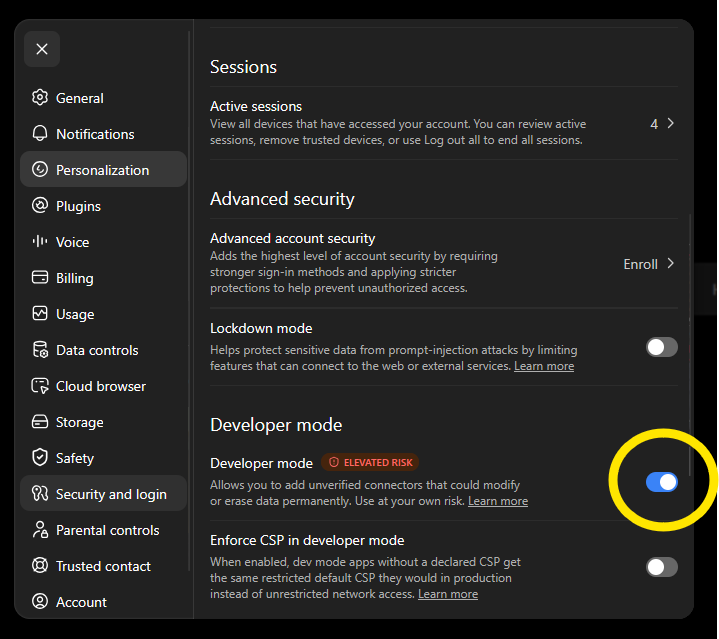
Open ChatGPT and go to Settings → Security and login. Enable Developer mode.
Connect ChatGPT, Claude or your AI agent to structured investment intelligence through MCP.
Give ChatGPT direct access to structured investment data, peer comparisons, risk metrics and market context. ValueRay provides the research data. Your AI turns it into an analysis you can understand.
Free access is available. Upgrade later when you need deeper research and higher usage limits.
This guide uses ChatGPT as an example. ValueRay can also be connected to other compatible AI systems and agents through MCP.
Open ChatGPT and go to Settings → Security and login. Enable Developer mode.
Open Plugins in ChatGPT and click the plus symbol in the upper-right corner.
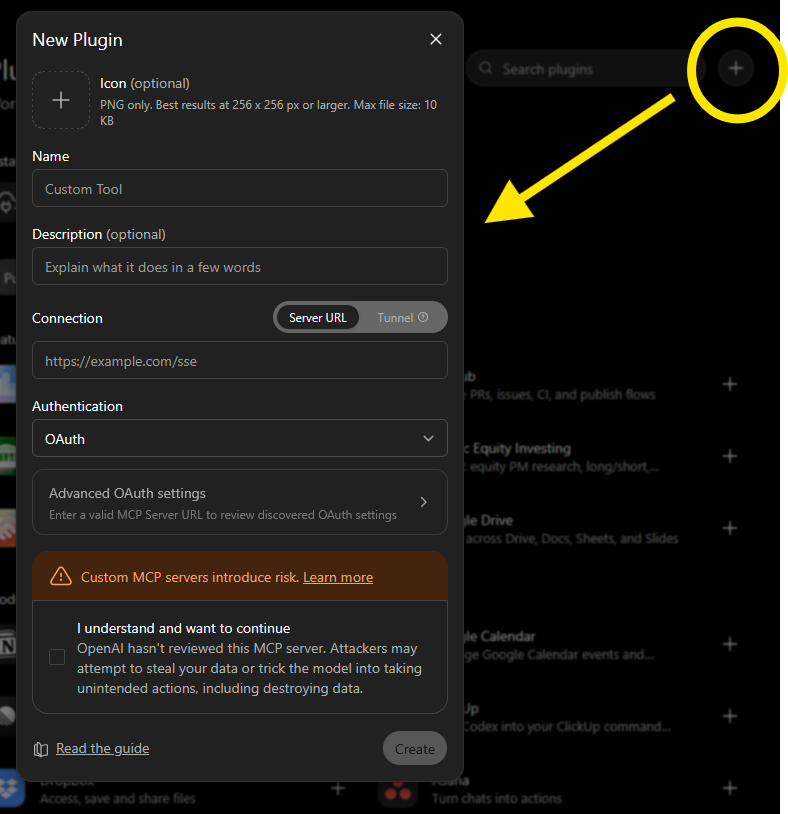
https://www.valueray.com/mcp/api
Select OAuth as the authentication method. ChatGPT will display an individual callback URL.
Copy the callback URL shown by ChatGPT. It normally begins with:
https://chatgpt.com/connector/oauth/...
Open your ValueRay profile and create a new OAuth client under Build your own app.
ChatGPT
Callback URL copied from ChatGPT
Return to ChatGPT and enter the Client ID and Client Secret created in your ValueRay profile.
| Server URL |
https://www.valueray.com/mcp/api
|
| Authentication | OAuth |
| Client ID | Your ValueRay Client ID |
| Client Secret | Your ValueRay Client Secret |
| Authorization URL |
https://www.valueray.com/oauth/authorize
|
| Token URL |
https://www.valueray.com/oauth/token
|
Activate the I understand and want to continue checkbox and click Create.
ChatGPT redirects you to ValueRay. Review the request and approve the connection.
Copy the prompt and paste it into ChatGPT after the connection has been approved. ChatGPT can then request ValueRay data and use it for the analysis.
Is Apple a good stock to buy now?

Use ValueRay to analyze AAPL on NASDAQ. Review the full research data and compare Apple with its peer group.

Explain the result in plain language. Identify the main strengths, risks and relevant alternatives. Separate facts from interpretation and explain whether Apple currently appears attractive compared with similar companies.
ValueRay cannot access your complete ChatGPT conversations.
ValueRay processes only the specific requests sent to the MCP server.
OAuth clients can be deleted from your ValueRay profile whenever you choose.
Copy and store the secret when the OAuth client is created.
Connect ValueRay and receive structured research directly inside ChatGPT.
Create Free AccountFree access is available. Upgrade later when you need deeper research and higher usage limits.
Use the ValueRay REST API with a Bearer token for scripts, applications and custom integrations.